
The end of the digital dead end: Why Signal finally broke the backup wall

A few years ago, switching from an iPhone to an Android device felt like a small act of digital self-destruction for a Signal user. You could move your contacts and your photos; you could even move your paid apps. Your Signal message history was a different story. It was a localized, encrypted treasure chest that lived and died on its original hardware. To switch platforms was to accept a clean slate, a blank screen where years of context and shared history once lived. Historically, Signal users accepted this friction as the price of true privacy. We traded the convenience of a unified history for the security of knowing no server held the keys to our conversations.
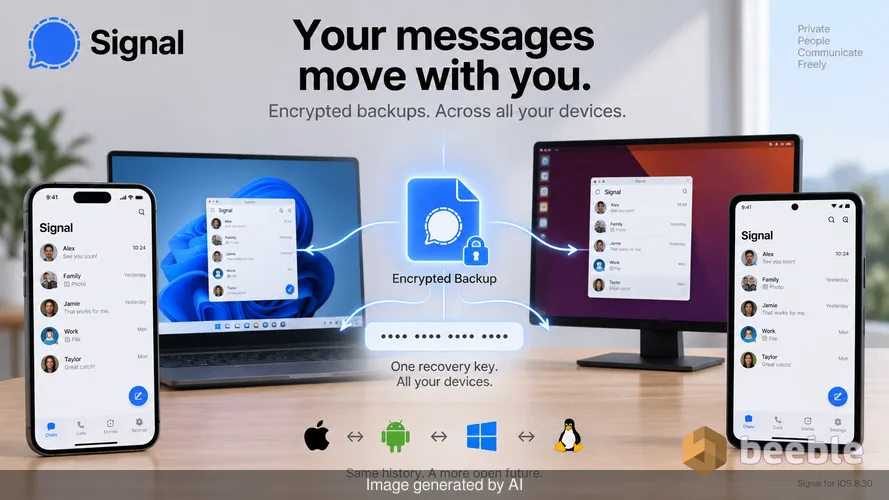
Signal for iOS 8.30 marks the end of this digital dead end. The update introduces encrypted local backups for iPhone and desktop users, alongside a unified cross-platform restore system. This change is a shift from the platform-siloed architecture of the past to a more resilient, user-controlled future. The walls between Android, iOS, and desktop have finally crumbled. A user can now move an archive from a Windows laptop to a Linux workstation or from an iPhone to an Android tablet with the same recovery key.
The architecture of a portable history
Under the hood, the engineering effort required to make this work was a massive undertaking. For years, Android users had access to local backups, but these were built on a legacy format that was incompatible with the direct wireless transfer method used by iOS. The new system replaces these fragmented approaches with a standardized, cross-platform backup format. Technically speaking, this is a pragmatic move that treats the user's data as a sovereign asset rather than a byproduct of a specific operating system.
Signal also changed how the app handles media storage within these archives. In older versions of the software, every time you forwarded a photo to a new group, the app saved a new copy of that file. Over months and years, this led to a bloated database where the same meme or family photo occupied dozens of megabytes of space. The new backup system uses a de-duplication strategy. It stores the media file once and simply points every conversation that uses it back to that single master copy.
This optimization is a relief for anyone who has watched their phone storage vanish into the void of a messaging app. Signal estimates that 5 GB of media can now be optimized down to about 600 MB of active storage. This is the difference between a phone that functions smoothly and one that constantly warns you about full disk space. By separating the media from the main message archive, Signal ensures that the core database remains small and fast, even as your library of photos grows.
The cloud as a digital storage unit
Historically, Signal resisted hosted backups because they introduced a single point of failure. If the company held the data, the company could be compelled to turn it over. The new Secure Backups system solves this by using a Trusted Execution Environment (TEE). This is a specialized area of a processor that acts like a black box; it can perform calculations and rotate encryption keys, but even the administrators of the server cannot see what is happening inside.
In everyday terms, this hosted backup is a digital storage unit where only you have the key. For users who opt for the paid subscription, Signal now allows the offloading of older media to these secure servers. A thumbnail remains in your chat history, but the full-sized video or high-resolution photo is stored in the cloud. When you tap to view it, the app fetches the encrypted file, decrypts it locally, and displays it. This tiered approach is a direct response to the reality of modern hardware. Our phones are powerful, but high-resolution video is a storage-hungry monster that eventually slows down even the most agile devices.
The security trade-off between local and hosted
Curiously, there is a distinct security difference between a backup you keep on a USB drive and one you keep on Signal’s servers. Hosted backups utilize a supplemental key that rotates daily within the TEE. This adds a layer of forward secrecy. If someone were to steal your recovery key tomorrow, they could not use it to decrypt a hosted backup from three years ago because the server-side key has changed thousands of times since then.
Local backups lack this rotating guardrail. A local backup is a static snapshot. If you save a backup to an external drive today, your current recovery key will always be able to unlock it. Consequently, the responsibility of data hygiene shifts to the user. Deleting old, unnecessary local backups becomes a technical necessity rather than just a way to tidy up. If you keep a decade of local backups on a single drive, that drive is a permanent map of your life that relies entirely on the secrecy of one 30-digit string of numbers.
From a developer's standpoint, this distinction is a masterclass in transparency. Signal is not claiming that one method is objectively better; they are providing the technical facts so users can choose their own threat model. Some will prefer the physical control of a thumb drive in a safe; others will prefer the forward secrecy and convenience of the hosted TEE system.
Breaking the desktop barrier
For a long time, Signal Desktop was the awkward cousin in the ecosystem. It was a secondary device that only started recording history the moment it was linked. If you joined a group on your phone and then linked your laptop a week later, your laptop would show a blank screen for that group. You could see new messages, but the context was missing.
Signal for Desktop now has the ability to request missing data from your primary device. Through this user lens, the experience finally feels seamless. If you see a blurred thumbnail for an old attachment on your computer, you can tap it to request a copy from your phone. As long as the phone has the file and both devices are online, the encrypted data travels between them. This removes the digital friction that has plagued desktop users for nearly a decade. The app no longer feels like a series of disconnected islands; it is a single, interconnected conversation.
Reclaiming the right to your own history
Ultimately, this update is about more than just file formats or storage tiers. It is an acknowledgment that our digital conversations are not just ephemeral bits of data; they are our personal histories. In the proprietary ecosystems of big tech, backups are often used as a hook for ecosystem lock-in. Moving your data out is intentionally difficult because the company wants to keep you within their garden.
Signal is doing the opposite. By creating a unified, cross-platform backup format, they are giving users a way out. You are free to move your data to a different operating system or a different device without losing your past. This is a pragmatic application of the open-source philosophy. The code serves the user, not the platform owner.
As we navigate an era where our data is increasingly fragmented across dozens of apps and services, the ability to hold a physical, encrypted copy of your own history is a rare luxury. It is a reminder that you own your words. You are not just a tenant in a messaging app; you are the owner of the archive. Signal’s new backup system is a tool for digital sovereignty. It demands a bit more responsibility from the user, but in exchange, it offers a level of control that is almost extinct in the modern web.
Takeaways for digital self-reflection:
- Consider whether you prefer the forward secrecy of TEE-hosted backups or the physical sovereignty of local storage.
- Audit your old backups on external drives; if you no longer need them, delete them to maintain the security of your recovery key.
- Observe how much of your phone’s storage is occupied by duplicate media and consider if media offloading fits your needs.
- Ensure your 30-digit recovery key is stored in a physical location or a secure password manager rather than a digital screenshot.
Sources
- Signal Developer Documentation: Secure Backups technical specifications.
- Signal Blog: Release notes for iOS version 8.30.
- GitHub: Signal-iOS and Signal-Desktop commit history regarding backup format unification.
- Signal Security Research: Documentation on Trusted Execution Environments and supplemental key rotation.



See you on the other side.
Our end-to-end encrypted email and cloud storage solution provides the most powerful means of secure data exchange, ensuring the safety and privacy of your data.
/ Create a free account