


The Quiet Migration: Why Your Next Computer Might Not Run Windows or macOS

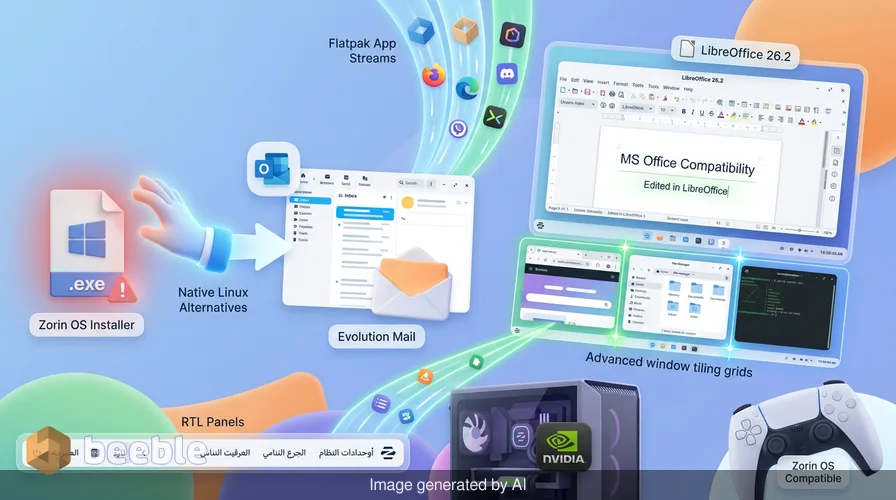
You double-click a file. It is a .exe, the universal symbol of Windows software, and for decades, this was a dead end for anyone venturing outside the Microsoft ecosystem. On most Linux distributions, this action would result in a sterile error message or a confusing prompt to install a dozen missing libraries. But in Zorin OS 18.1, the experience is different. A window appears, not with a warning, but with a polite suggestion: "This app has a native version that runs faster and more securely on your system."
Behind that simple click lies a sophisticated logic gate that queries an expanded database of over 240 applications, weighing the compatibility of the WINE translation layer against the streamlined performance of a native Flatpak or Snap package. This micro-interaction is the perfect entry point to understanding Zorin OS 18.1. It is not just an operating system; it is a meticulously crafted bridge designed to span the chasm between the proprietary walled gardens we have grown used to and the transparent, resilient world of open-source software.
The Architecture of Familiarity
Zooming out to the industry level, we see a growing tension in the world of personal computing. As Windows and macOS become increasingly bloated with telemetry and AI-driven features that few users requested, the cognitive load of simply "using a computer" has increased. Paradoxically, as hardware gets faster, the user experience often feels more fragmented. Zorin OS 18.1 addresses this by treating the user interface as a form of digital hospitality.
At its core, the system relies on the Zorin Appearance app. This utility allows users to toggle between layouts that mimic Windows, macOS, or even classic GNOME with a single click. For a professional editor or a student, this isn't just about aesthetics; it is about reducing the friction of the learning curve. Technically speaking, this is achieved through a highly customized GNOME 47 stack, but to the average user, it simply feels like their digital home has been renovated without moving the furniture. It is a pragmatic solution to a profound problem: how do we move users to a better platform without making them feel like strangers in their own workspace?
Under the Hood: Stability and Sustainability
Historically, Linux was seen as the domain of the tinkerer—the person who didn't mind editing a config file to get their Wi-Fi working. Zorin OS 18.1, built on the robust foundation of Ubuntu, flips this narrative. It provides enterprise-grade stability that is de facto standard in environments where failure isn't an option, from the servers powering the New York Stock Exchange to the International Space Station.
Under the hood, version 18.1 is powered by the Linux 6.17 kernel. This choice is significant. It ensures that the latest hardware—like Intel Xe3 graphics or the newest Lenovo ThinkPads—works seamlessly out of the box. Through this user lens, the operating system acts like a city's infrastructure: invisible when it works perfectly, providing the water and electricity of computing power so you can focus on the work itself.
This release also marks the triumphant return of the Lite edition. Based on XFCE 4.20, it is specifically tuned for hardware that the tech industry has labeled as legacy. In a world of planned obsolescence, Zorin OS 18.1 Lite acts as a restorative, breathing new life into 15-year-old laptops. It is a direct challenge to the idea that you need to buy a new machine every three years just to keep up with OS bloat.
The Productivity Pivot: LibreOffice 26.2
Software updates are often like home renovations—disruptive but necessary. Zorin OS 18.1 bundles LibreOffice 26.2, which represents a major leap in interoperability. For years, the Achilles' heel of the open-source office suite was the "clunky" way it handled Microsoft’s proprietary .docx and .xlsx formats.
In everyday terms, this update means the formatting of your complex spreadsheets or heavily styled resumes will remain intact when shared with colleagues on proprietary platforms. With new features like Markdown support and refined connector shapes in Calc, the suite feels less like a "free alternative" and more like a professional-grade tool that stands on its own merits. It is a move away from being a mere imitation of Microsoft Office toward becoming a robust ecosystem for modern creators.
A New Standard for Privacy and Play
Curiously, Zorin OS 18.1 has also become a darling of the gaming community. This is not by accident but by design. By integrating support for NVIDIA drivers and the latest Vulkan APIs, and pre-configuring tools like Steam and Lutris, the developers have eliminated the technical debt that used to plague Linux gaming. Whether you are using a PS5 DualSense controller or a handheld like the ROG Ally, the system recognizes the hardware instantly.
Ultimately, the shift to Zorin is a shift in ownership. Proprietary operating systems often feel like rented apartments where the landlord can enter at any time to collect data on your habits. Zorin OS, being open-source, is a home you actually own. It doesn't track your clicks, it doesn't sell your search history to advertisers, and it doesn't force you into an ecosystem lock-in.
| Feature | Zorin OS 18.1 Core | Zorin OS 18.1 Pro |
|---|---|---|
| Price | Free | Paid (Support the Devs) |
| Interface Layouts | 4 (Windows, Touch, etc.) | 6+ (macOS, Windows 11, etc.) |
| Software Suite | Essential | Professional & Creative |
| Hardware Support | Full (Kernel 6.17) | Full (Kernel 6.17) |
| Technical Support | Community | Direct Developer Support |
Reclaiming the Digital Experience
Zorin OS 18.1 arrives at a time when we are all feeling a bit of "subscription fatigue" and a loss of control over our digital tools. The developers have managed to package the complexity of modern computing into an interface that feels intuitive and transparent.
On an individual level, switching to an OS like Zorin is an act of digital self-reliance. It asks the reader to observe their own software habits and question why we accept the frustrations of mainstream systems as inevitable. If you have been hesitant to leave the familiar shores of Windows or macOS, Zorin OS 18.1 is the most stable and welcoming vessel available to help you cross over. It proves that software can be powerful without being opaque, and advanced without being exclusionary.
Sources:
- Zorin Group: Official Release Notes for Zorin OS 18.1 and 18.1 Lite.
- Ubuntu Developer Documentation: Kernel 6.17 Hardware Compatibility List.
- The Document Foundation: LibreOffice 26.2 Feature Log and Interoperability Report.
- XFCE Desktop Environment: 4.20 Release Highlights and Performance Benchmarks.
- WineHQ: Database Updates for Windows Application Support on Linux Systems.



See you on the other side.
Our end-to-end encrypted email and cloud storage solution provides the most powerful means of secure data exchange, ensuring the safety and privacy of your data.
/ Create a free account
