
The silent shift from phone numbers to multi-device identities

In 2014, a user who wanted to check a secure message on their tablet had to pick up their phone instead. For years, Signal operated on a strict one-to-one relationship between a phone number and a physical handset. This architectural choice was a security feature; it was also a source of daily friction for users with multiple screens. The smartphone became a digital anchor that tethered an identity to a single piece of hardware. When that hardware was lost or out of reach, the user was effectively locked out of their own digital life. This was the era of the primary device, where software was a slave to the SIM card.
The legacy of the primary device
Historically, digital communication was tethered to the copper wires of a house; today, it is tethered to the silicon of a single smartphone. Early messaging apps relied on the SIM card as a hardware-based root of trust; modern software tries to abstract this identity into a portable digital account. Signal was a holdout in this transition. The developers prioritized the security of a single endpoint; the market demanded the convenience of ubiquitous access. This tension defined the last decade of secure messaging. For a long time, the only way to use Signal on two phones was to register two different numbers. This fragmented the user experience and forced people to manage separate contact lists. The primary phone was the gatekeeper of the account. It handled all encryption keys and identity proofs. If the phone was offline, the desktop app could still function, but the initial setup always required that physical proximity to the primary device.
Technically speaking, the reliance on a single phone number is a legacy of the telecommunications industry. Mobile apps inherited this structure because it was an easy way to verify identity without requiring a traditional username and password. However, this convenience created technical debt for developers who wanted to build multi-device systems. Each new device added to an account increases the complexity of the encryption scheme. In a standard cloud-based app, the server stores all messages and serves them to whichever device logs in. In an end-to-end encrypted environment, the server has no access to the content. The challenge was to synchronize history and keys across devices without compromising the core security model of the app.
The mechanics of the secondary link
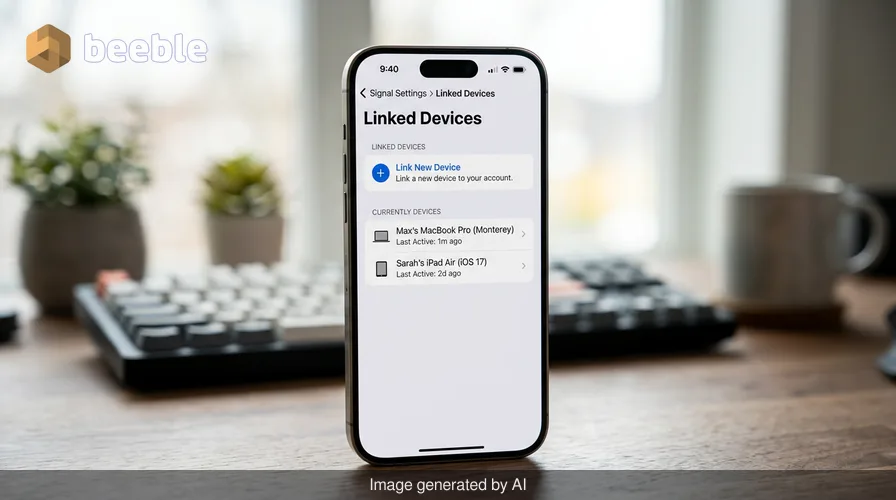
The latest Signal beta version introduces a pragmatic solution to this long-standing limitation. Users can now add an Android phone or tablet as a secondary device. The process is a refined version of the desktop linking system. A user downloads the app on their secondary Android device; they navigate to the "Link device" option hidden in the kebab menu on the welcome screen. The primary phone scans a QR code generated by the new device. This simple visual interaction triggers a complex cryptographic handshake. The primary device verifies the identity of the secondary device; it then shares the necessary keys to join the account. This process removes the need for a second phone number. The account is now a single entity that exists across multiple screens.
Once the link is active, Signal offers an option to synchronize chat history. This is a significant shift in the app's behavior. Previously, new devices started with a blank slate. The synchronization process is a heavy operation for the primary phone. It must re-encrypt the local database for the new device's specific public key. If the user skips this step during setup, they cannot simply toggle it on later. They must reinstall the app and start the linking process again. This design choice is a security measure; it ensures that a compromised device cannot silently request a full history sync at a later date. The user has total control over the initial data transfer.
The technical hurdle of synchronized privacy
Under the hood, Signal uses the Sesame protocol for session management across multiple devices. This is an extension of the Double Ratchet algorithm that handles the encryption of individual messages. When a sender sends a message to a user with three linked devices, their app actually sends three separate versions of that message. Each version is encrypted with a unique key for the specific recipient device. Behind the screen, the app manages an ever-changing set of keys for every contact. Adding a second Android phone into this mix is more difficult than adding a laptop. Computers have stable operating systems and large amounts of storage; mobile devices have aggressive battery optimization and restricted background processes.
Paradoxically, the move toward multi-device support makes the system more resilient while increasing the computational load. The app must ensure that read receipts, deletions, and profile updates reflect accurately on all screens. If a user deletes a message on their tablet, the primary phone must receive a synchronization message to perform the same action. This creates a hidden web of traffic that happens without user intervention. The engineering goal is to make this process feel seamless. In reality, it is a constant battle against network latency and the fragmented state of Android hardware. A low-end tablet might take several seconds to process a batch of incoming synchronization messages; a flagship phone might do it in milliseconds.
Why tablet interfaces are finally maturing
The beta also includes a specific interface update for tablets. This is a response to the growing trend of using tablets as laptop replacements. For years, Android tablet apps were just stretched versions of phone interfaces. They were clunky and wasted significant screen real estate. The new Signal view uses a split-screen layout. A panel on the left displays the chat list; a larger panel on the right contains the active conversation. This design is intuitive for anyone who has used a desktop messaging app. It allows for faster navigation and better multitasking. The user can keep track of multiple conversations while they type.
This UI shift is a sign of a larger trend in the software industry. Developers are moving away from the "mobile-first" mantra toward a "context-first" approach. A tablet in landscape mode is a different tool than a phone in a pocket. The code now recognizes this difference. The ability to customize the view—such as removing the chat list to focus on a single conversation—is a nod to user agency. It acknowledges that the software should adapt to the user's workflow rather than forcing the user into a one-size-fits-all box. This is a shift from proprietary, rigid designs toward more flexible, professional layouts.
The industrial move toward account-based security
Zooming out to the industry level, we see a slow death of the phone number as a primary identifier. Tech giants are trying to move users toward proprietary account systems. Apple uses the Apple ID; Google uses the Google Account. These systems create ecosystem lock-in. Signal is taking a different path. It is keeping the phone number as the root of the account but breaking the link to a single device. This is a pragmatic middle ground. It maintains the ease of finding contacts through a phone book; it provides the flexibility of a modern digital identity. Through this user lens, the software is becoming more transparent. The hardware matters less than the access to the data.
This shift is also a response to the way we work today. The boundary between professional and personal life is increasingly opaque. A person might use their main phone for quick replies while they are out; they might use a tablet for longer discussions at their desk. Digital friction occurs when the tool gets in the way of this transition. By allowing multiple Android devices, Signal is removing a layer of friction that has existed for a decade. This is not just a new feature; it is an acknowledgment that our digital lives are no longer contained within a single pocket-sized rectangle. The software infrastructure is finally reflecting the multi-screen reality of the modern world.
Reclaiming the digital workspace
Ultimately, the ability to link an Android tablet or a second phone is about control. It is about the user deciding which screen is appropriate for the moment. We are moving away from the era where our tools dictated our habits. The technical complexity required to sync end-to-end encrypted chats across mobile devices is immense, but the result is a more resilient and flexible experience. Users should observe their own digital habits and notice where the friction exists. Often, that friction is the result of legacy code or old business models that no longer fit our lives.
As these features move from beta to the general public, the concept of a "primary device" will likely continue to fade. We will stop thinking about our accounts as being "on our phone" and start thinking about them as being "accessible through our devices." This is a subtle but profound change in digital literacy. It requires us to understand that our data is not the same thing as the glass and metal we hold in our hands. The code is the bridge between our identity and our hardware. Signal's update is one more step toward a future where that bridge is wider, stronger, and more reliable. The phone is no longer the person; the person is the account, and the account is now everywhere.
Sources
- Signal Messenger. Official Support Documentation: "Linking a device."
- Signal Foundation. Technical Blog: "The Sesame Algorithm: Session Management for Asynchronous Messaging."
- AboutSignal. Report: "Signal Beta 7.x: Android tablet and secondary phone support."
- Signal Messenger. GitHub Repository: "Signal-Android source code and release notes."
- Google Play Store. Signal Beta program description and update logs.



See you on the other side.
Our end-to-end encrypted email and cloud storage solution provides the most powerful means of secure data exchange, ensuring the safety and privacy of your data.
/ Create a free account