


The Silent Shift in How Microsoft Rebuilds Your Trust

The cursor blinks. The progress bar stalls at 84%. You sigh, staring at the screen, wondering if this latest update will be the one that finally breaks your workflow. For years, the Windows Insider Program has felt like a high-stakes gamble for the curious. To glimpse the future of the operating system, you had to navigate a labyrinth of channels—Canary, Dev, Beta, Release Preview—each with its own level of risk and its own set of technical hurdles. If you chose the wrong path, the only way back was a scorched-earth reinstallation of the entire system. It was a digital tax on early adopters, a clunky remnant of an era where software was something you installed once and feared forever.
Zooming out to the industry level, this individual frustration is a symptom of a much larger architectural struggle within Redmond. Microsoft has spent the last decade trying to transform Windows from a static product into a dynamic service, but that transition has been haunted by the ghost of technical debt. When the company recently published its “commitment to Windows quality,” it wasn't just corporate PR; it was a public admission that the infrastructure of our digital lives has become too fragile. The newly announced overhaul of the Windows Insider Program is the first concrete step in addressing this fragility, moving away from a fragmented testing model toward something more streamlined and, ultimately, more respectful of the user’s time.
The End of the Testing Labyrinth
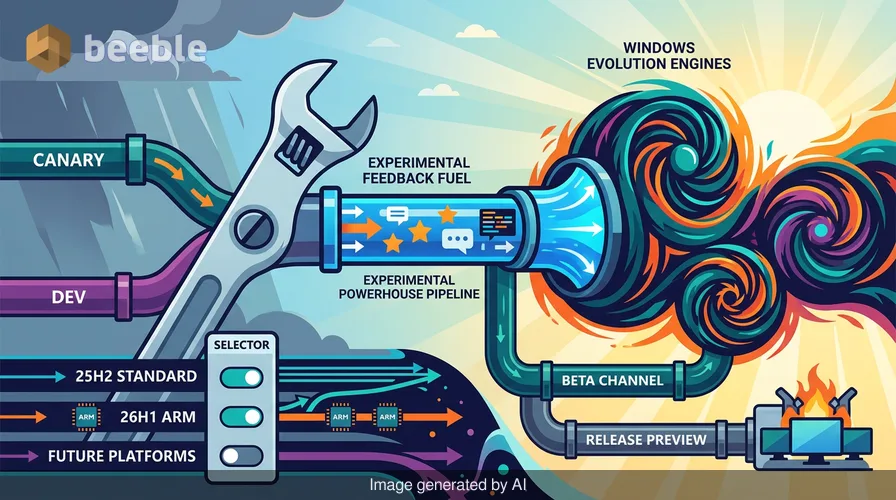
Historically, the Windows Insider Program was a sprawling map of overlapping goals. The Canary and Dev channels often felt redundant, serving as a dumping ground for ideas that might never see the light of day, while the Beta channel was frequently too far behind to feel relevant. Under the new reorganization, Microsoft is collapsing this complexity. The Canary and Dev channels are being merged into a single “Experimental” channel. This is where the raw, disruptive ideas will live—the place where code is a blueprint still being sketched.
In contrast, the Beta channel is being repositioned as the pragmatic choice for those who want to see what’s coming without the constant fear of a system crash. It is no longer just a “slower” version of the Dev channel; it is a distinct tier for features that are closer to their final form. By narrowing the focus, Microsoft is attempting to reduce the noise in their feedback loop. But why does this matter to someone who isn't a power user? Essentially, it suggests that Microsoft is finally prioritizing the stability of the core experience over the sheer volume of new features.
Architecture Over Aesthetics
Under the hood, the most profound change isn't the names of the channels, but how the software itself is delivered. For the first time, Microsoft is introducing toggles that allow users to select their specific baseline version of Windows—such as the 26H1 version optimized for Arm-based PCs or the standard 25H2 version. This is a subtle but vital shift toward a more modular operating system. It acknowledges that the hardware landscape is becoming increasingly fragmented, and a one-size-fits-all update strategy is no longer viable.
Through this user lens, the real breakthrough is the “in-place upgrade.” Previously, moving between the more experimental branches of Windows and the stable release was a one-way street. If you wanted to leave the Canary channel, you had to wipe your hard drive and start from scratch. It was like having to tear down your entire house just because you decided you didn't like the new wallpaper in the living room. Now, as long as you stay within the same core version of the OS, you can hop between channels while preserving your data. This technical achievement suggests that Microsoft is finally cleaning up the messy closet of its deployment system, making the transition between experimental and stable code much more seamless.
The Paradox of Quality
Paradoxically, the most telling part of this overhaul is what’s happening to the Release Preview channel. Once a prominent fixture for enthusiasts, it is now being tucked away as an “advanced” option primarily for IT professionals. This move signals a shift in who Microsoft views as its primary quality-assurance partners. By hiding the near-final builds from the general public, they are acknowledging that the final stages of testing require a clinical, professional environment rather than the chaotic variety of the average home user’s PC.
Is this enough to fix the overarching issues with Windows quality? From a developer's standpoint, the answer depends on how Microsoft handles the feedback it receives in the new Experimental channel. If the company continues to push bloated features that prioritize engagement over utility, no amount of channel reorganization will save the user experience. However, the introduction of a “Future Platforms” option—a space for builds that aren't even aligned with a retail version of Windows—suggests a new willingness to experiment in a sandbox without polluting the main codebase. It’s an attempt to separate the “what if” from the “what is.”
Reclaiming the Desktop
Ultimately, an operating system is like a city's infrastructure: it should be invisible until a pipe bursts. For too long, Windows users have been forced to act as amateur plumbers, constantly checking for leaks and patching holes created by inconsistent updates. This overhaul of the Insider Program is an attempt to put the tools back in the hands of the engineers and give the users back their peace of mind.
On an individual level, this change invites us to rethink our relationship with the “Update” button. We should no longer view ourselves as unpaid beta testers for a trillion-dollar corporation, but as stakeholders in a digital environment that needs to be robust and resilient. As you navigate these new channels, observe the friction. If a feature feels clunky or an interface feels opaque, use the feedback tools. The new structure is designed to make that feedback more impactful, but its success depends on our willingness to demand clarity over feature creep. The era of the mandatory “wipe and reinstall” may be ending, but the work of building a truly high-quality operating system is only just beginning.
Sources:
- Microsoft Windows Insider Blog: Announcements by Alec Oot regarding program reorganization.
- Windows Engineering Documentation: Release cycle management and versioning (25H2/26H1).
- Microsoft Support: Documentation on in-place upgrades and data preservation during OS transitions.
- Industry Analysis: Reports on Windows quality initiatives and the evolution of the Windows-as-a-Service model.



See you on the other side.
Our end-to-end encrypted email and cloud storage solution provides the most powerful means of secure data exchange, ensuring the safety and privacy of your data.
/ Create a free account
