


Why the Wi-Fi 7 sticker on your next router might be lying to you

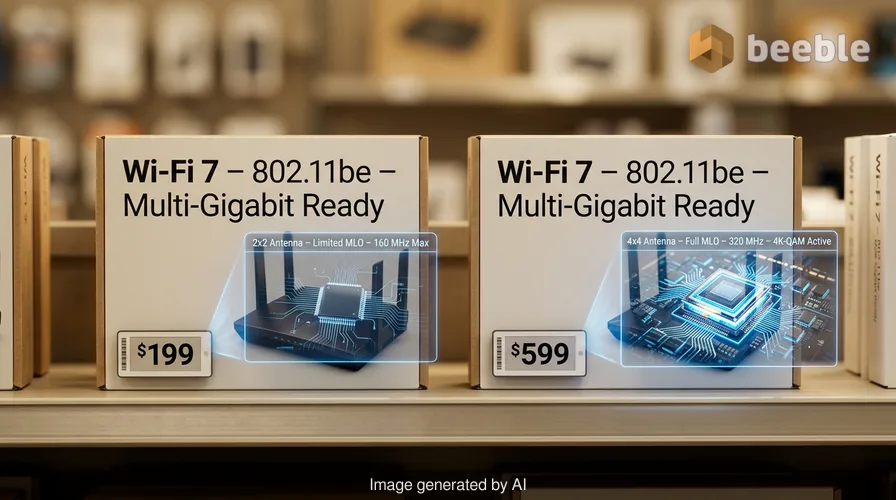
Have you ever wondered why two routers with the exact same Wi-Fi 7 label have a price difference of four hundred dollars? For most of us, internet hardware is the digital plumbing of the modern home. We buy it, plug it in, and hope the loading icons on our screens disappear. But the current transition to the Wi-Fi 7 standard is different from previous generations. It is messier, more expensive, and filled with technical traps that even savvy buyers might miss. Brands promise faster speeds and lower latency, but the reality inside the box often fails to match the marketing on the outside.
The technical guts of the new standard
Wi-Fi 7 is the commercial name for the 802.11be wireless networking standard. In simple terms, this technology acts like a multi-lane superhighway for your data. While previous standards like Wi-Fi 6 used narrow lanes, Wi-Fi 7 doubles that width to 320 MHz. This allows the system to handle multi-gigabit internet plans and fast local file transfers. It also uses 4K-QAM to pack more data into every signal.
To understand 4K-QAM, imagine a shipping container. In the Wi-Fi 6 era, a single container held 10 bits of data. With Wi-Fi 7, that same container holds 12 bits. This represents a 20% increase in data density. While this sounds like a small change, it helps the network stay fast when dozens of smart home devices try to talk at once. However, the most significant addition is Multi-Link Operation, or MLO. This technology allows a device to talk to a router using three frequency bands at the same time.
Historically, your devices had to choose one band: 2.4 GHz, 5 GHz, or 6 GHz. If one band was crowded, your speed dropped. MLO changes this by treating all three bands as a single, combined resource. Traffic is distributed based on which band is the least crowded at that exact millisecond. This should lead to much lower latency for gaming and video calls.
The clever loophole in a single hyphen
Keep your eyes peeled when you walk down the electronics aisle. The difference between "Wi-Fi 7" and "WiFi 7" is not just a stylistic choice. The Wi-Fi Alliance owns the trademark for the term "Wi-Fi" with a hyphen. This organization sets the rules for certification. If a company wants to use the official logo, it must pass tests that prove the hardware has essential features like MLO.
However, brands discovered a loophole. By removing the hyphen and labeling a product as "WiFi 7," they are no longer using the trademarked term. This means they are not bound by the certification requirements. As a result, many products on the market have the WiFi 7 label but omit MLO entirely. Shoppers pay a premium price for a device that lacks the most important part of the upgrade. This practice makes it difficult to know if a $100 router is a bargain or a stripped-down imitation of the real standard.
Why your house probably is not ready for these speeds
Practically speaking, a Wi-Fi 7 router is a high-performance engine in a car with no wheels if your devices are old. Most smartphones, tablets, and laptops in use today have Wi-Fi 6 or 6E chips. Apple only introduced Wi-Fi 7 with the M5 chip in early 2026. If you have an older MacBook Pro or an iPhone from 2024, your hardware cannot use the 320 MHz channels or MLO. Your internet speed remains limited by the physical chip inside your device.
Your home internet plan also acts as a bottleneck. Wi-Fi 7 is capable of delivering local speeds between 2 Gbps and 3.5 Gbps. If you pay your internet provider for a standard 500 Mbps plan, a new router will not magically make your internet faster than that limit. It is like building a ten-lane bridge that leads to a dirt road. The bridge has plenty of capacity, but the traffic can only move as fast as the dirt road allows. For most households, the extra speed is invisible in everyday life.
The truth about MLO performance
Even when a router has the official certification, performance is not guaranteed. There are two ways to implement MLO. The best version is Simultaneous Transmit and Receive, or STR. This requires multiple physical radios to work together perfectly. The cheaper version is Non-Simultaneous Transmit and Receive, or NSTR. This version forces the router to alternate between bands instead of using them together.
RTINGS tested 25 routers in February 2026 and found that true simultaneous MLO is rare. Most consumer routers use the cheaper NSTR method, which leads to fluctuating speeds. Their conclusion was that many Wi-Fi 7 routers are not worth the price difference over older models right now. Manufacturers make bold claims about performance, but the hardware under the hood often uses the cheapest possible path to meet the certification baseline.
The federal blockade on new router hardware
On the market side, the US faces a unique challenge. On March 23, 2026, the Federal Communications Commission blocked the certification of new wireless hardware designed or assembled outside the United States. This decision hit the router industry hard. Most networking gear comes from factories in Asia that are now under scrutiny. This ban effectively froze the market for many popular brands.
Companies like Netgear and Eero received exemptions after they promised to move their manufacturing to the US. However, other major brands like TP-Link and ASUS are in a difficult position. They are only allowed to sell models that were certified before the ban started. This means the newest and most capable Wi-Fi 7 designs are not available in American stores. Consumers are left with a choice between expensive US-made models or older designs that may have the technical flaws mentioned earlier.
How to choose the right gear for your home
Looking at the big picture, a router is an investment in your home infrastructure. You should not pay a premium for a dream that your devices do not support. Currently, the market is a mix of older models and uncertified budget gear. If your current setup handles your daily tasks and your speed tests match your internet plan, there is no reason to upgrade yet.
Wi-Fi 6E remains the practical choice for most people. It includes the 6 GHz band, which acts as an express lane to avoid interference from neighbors. These routers are much cheaper than Wi-Fi 7 models and offer all the performance a standard gigabit internet plan requires. Wi-Fi 7 only becomes a tangible benefit if you have a multi-gigabit fiber plan and a house full of 2026-era hardware.
Ultimately, the technology will become the standard, but the adoption path is slow. The hyphen loophole and the FCC ban have created an opaque market where price does not always equal quality. Check your device specs before you reach for your wallet. The high price tag on many new routers covers a promise of future utility that current laws and chips cannot fulfill.
| Feature | Wi-Fi 6 | Wi-Fi 6E | Wi-Fi 7 |
|---|---|---|---|
| Max Channel Width | 160 MHz | 160 MHz | 320 MHz |
| Frequency Bands | 2.4 & 5 GHz | 2.4, 5, & 6 GHz | 2.4, 5, & 6 GHz |
| Data Encoding | 1K-QAM | 1K-QAM | 4K-QAM |
| Multi-Link Operation | No | No | Yes (MLO) |
| US Availability | High | High | Limited by FCC |
Sources
- Federal Communications Commission (FCC) Hardware Certification Guidelines, March 2026
- Wi-Fi Alliance 802.11be Certification Standards and Trademark Documentation
- RTINGS Router Performance Benchmark Report, February 2026
- IEEE 802.11be Technical Specifications and Channel Width Requirements
- Apple M5 Chip Architecture Technical Briefing, 2026



See you on the other side.
Our end-to-end encrypted email and cloud storage solution provides the most powerful means of secure data exchange, ensuring the safety and privacy of your data.
/ Create a free account
