
How a grocery list for a barbecue explains the future of software

You open your phone. You type a request. You need a grocery list for a ten-person barbecue. The cursor blinks for a second. A list of hot dogs, buns, and charcoal appears. A blue button sits at the bottom. You click it. The items appear in your Instacart cart. You are done. This is the moment of friction-free digital magic that Google promised when it launched AI Mode. Behind the scenes, the process is mechanical. First, the large language model tokenizes your sentence to understand that barbecue means specific food items. Simultaneously, the system looks for an available tool that can handle commerce. Behind the scenes, Google generates a secure handshake with the Instacart API. If the model identifies an intent to purchase, then it sends a structured JSON payload to the partner server. This interaction is the latest update to Google’s conversational search experience, and it is a signal that the era of the static app icon is ending.
The transition from search to action
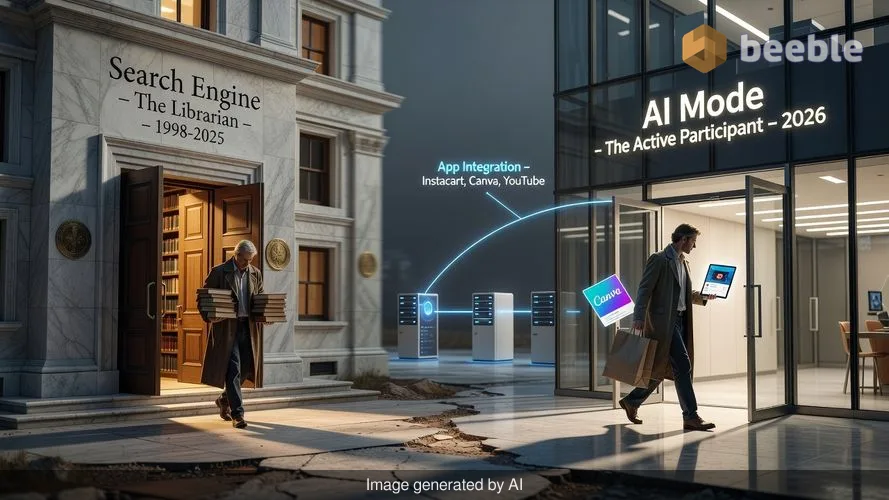
Google announced this Thursday that users in the U.S. can now link and interact with select apps like Instacart, Canva, and YouTube directly within AI Mode. For the average person, this feels like a minor convenience. It is the difference between copying a list from one screen to another and having it appear there automatically. However, zooming out to the industry level, this represents a fundamental shift in how we use the web. Historically, a search engine was a librarian that gave you a list of books. Now, Google wants the librarian to go to the store and buy the books for you. This update expands AI Mode beyond simple question-answering. It is an attempt to turn the browser into an active participant in your chores.
In practice, this means your interaction with a service like Canva changes. Instead of browsing through hundreds of templates on a blank canvas, you describe your flyer to the AI. Behind the screen, the AI communicates with Canva's template library. It returns a selection that fits your specific needs. The digital friction of the traditional user interface — the menus, the sidebars, the search bars within search bars — begins to evaporate. This shift is necessary for Google to remain competitive with OpenAI and Anthropic. Both rivals have spent the last year building similar app integrations, often called plugins or tools. Google is now leveraging its massive ecosystem to ensure users do not have to leave its environment to get things done.
The restaurant waiter and the hidden API
To understand why this is difficult to build, we should look at APIs as restaurant waiters. In a traditional app experience, you are the customer walking into the kitchen. You have to find the fridge, grab the ingredients, and cook the meal yourself. When Google links AI Mode to Instacart or YouTube Music, it acts as the customer, and the API is the waiter. The AI takes your order and gives it to the waiter. The waiter takes the order to the kitchen — the Instacart database — and brings back the data. If the kitchen is messy or the waiter does not speak the same language as the customer, the system fails.
Technically speaking, this relies on a concept called function calling. Developers at Google and their partner companies write code that tells the AI exactly what a specific app can do. If the user mentions a playlist, then the AI knows it should call the YouTube Music function. This is a complex dance of proprietary code and open-source standards. It requires a high level of trust between companies that were once content to stay in their own lanes. Now, they must open their doors to each other to keep users from drifting away toward more unified alternatives.
The rise of the headless software layer
This trend points toward a future of headless software. In the early days of the web, every site had a unique, sometimes clunky interface. We learned where the buttons were on every different store or social network. Paradoxically, as software becomes more advanced, the interface becomes less important. If an AI can handle your grocery shopping or your design work, you may never see the original app’s home screen again. This creates a streamlined experience for the user, but it also creates a new kind of fragmentation.
When we rely on a single AI Mode to manage our interactions, we are effectively handing the keys to our digital life to one gatekeeper. Google’s "Personal Intelligence" feature already taps into Gmail and Google Photos to provide individualized responses. Adding third-party apps to this mix makes the AI a central hub. Consequently, the individual apps become invisible utilities. They are like the pipes in a city’s infrastructure. You do not care which brand of pipe carries your water as long as the water arrives when you turn the faucet. For developers, this means the focus shifts from building a beautiful user interface to building a robust API that an AI can understand easily.
The cost of digital convenience
There is always a trade-off when we trade friction for speed. The legacy way of using the internet — opening tabs, comparing prices manually, and reading reviews — was slow. However, it offered a transparent view of the market. You saw the price of eggs at three different stores. You read the ingredients on the back of the box. In the new AI-mediated world, the model makes those choices for you. If you ask for barbecue supplies, the AI chooses which brand of charcoal goes into your cart. This is algorithmic curation at its most personal. It is efficient, but it is also opaque.
Behind the screen, this move helps Google fight ecosystem lock-in from other tech giants. By making AI Mode the primary way you interact with Instacart or Canva, Google ensures that you stay within the Google ecosystem. It is a pragmatic business move that solves a real user problem: app fatigue. We have too many icons on our screens and too many accounts to manage. A single text box that controls everything is an intuitive solution to a bloated digital life. But we must ask what happens when the AI makes a mistake. If a bug in the code results in the wrong ingredients arriving at your door, the path to a solution is not always clear.
Reframing our relationship with the interface
As this technology rolls out to more users in the U.S., it is worth observing how it changes our habits. We are moving away from being operators of software and toward being managers of software. We no longer click the buttons; we give the orders. This requires a new kind of digital literacy. It is no longer enough to know how to navigate a menu. We must now understand how to phrase a prompt so that the underlying code interprets our intent correctly.
Ultimately, the goal of these updates is to make technology invisible. When things work perfectly, you forget that there are millions of lines of code and hundreds of API calls happening every time you plan a party. But technology is never truly invisible. It is just hidden. On an individual level, we should remain curious about the mechanics. We should notice when the AI steers us toward one app over another. We should recognize that the seamlessness we enjoy is the result of a complex, often fragile, network of corporate partnerships and technical protocols.
Instead of simply accepting the convenience, take a moment to look at your apps and ask which ones you still want to visit in person. There is value in the manual process. There is a sense of control in picking your own templates or browsing a music library without an algorithm suggesting the next track. The AI Mode update is a powerful tool for productivity, but it is also a reminder that our digital tools are changing shape. We are the ones who decide if that change makes our lives better or just faster.
Key takeaways for the modern user
- Observe your intent: When you use AI Mode to complete a task, notice if the AI suggests a specific brand or service without your input.
- Understand the handshake: Remember that linking accounts involves sharing data between companies. Review your permission settings regularly.
- Identify the friction: Pay attention to which tasks feel better when automated and which ones lose their value when you are no longer in the driver’s seat.
- Question the curation: If an AI creates a playlist or a shopping list, look for what it left out. Algorithms prioritize the most likely choice, not always the best one.
Sources
- Google The Keyword: Official announcement regarding AI Mode app integrations.
- Google I/O 2024 and 2025: Keynote sessions on Gemini Extensions and third-party developer toolkits.
- Instacart Developer Platform: Documentation regarding API endpoints and partner integration standards.
- Canva Newsroom: Reports on AI-driven design workflows and template accessibility.
- Web Hypertext Application Technology Working Group (WHATWG): Standards for web application interoperability.



See you on the other side.
Our end-to-end encrypted email and cloud storage solution provides the most powerful means of secure data exchange, ensuring the safety and privacy of your data.
/ Create a free account