
Securing your digital footprint after the massive chrome 151 update

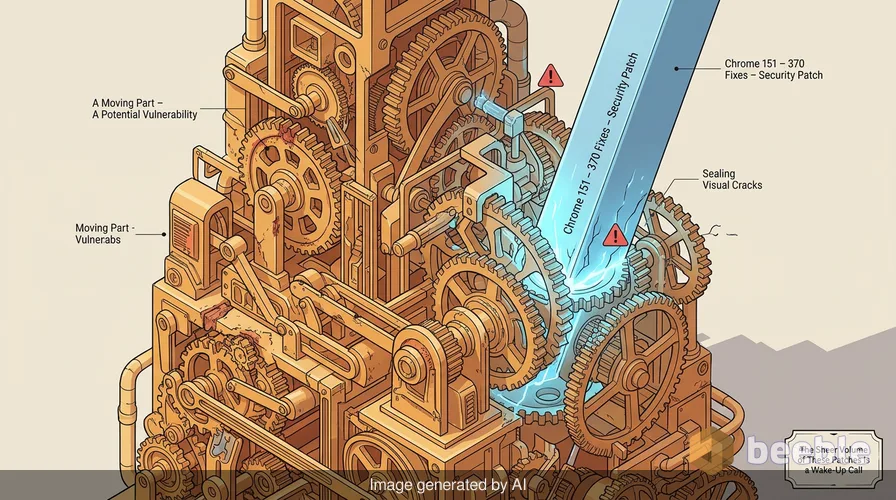
I opened my laptop yesterday to the familiar green 'Update' icon in the corner of my browser. Usually, these updates address minor stability issues or add features that most users never notice. This time is different. The release of Chrome 151 is a staggering security event that addresses 370 separate vulnerabilities. When a piece of software as hardened as Chrome requires 370 fixes in a single cycle, it is a reminder that the tools we use to access the internet are massive, complex machines with many moving parts.
Security updates of this scale are rare. Google pushed the version 151 update to Windows, Mac, and Linux users on July 29, 2026. The technical data reveals that the team fixed seven critical flaws alongside 71 high-severity issues. The sheer volume of these patches is a wake-up call for anyone who treats browser notifications as a nuisance rather than a priority. From a risk perspective, the variety of these bugs shows that attackers have many ways to compromise a system if the user remains on an outdated version.
The architectural paradox of browser security
Google invests millions of dollars into the sandbox architecture of Chrome. This design is supposed to isolate the browser from the rest of the operating system. In a perfect world, even if a website is malicious, it cannot reach your files or your webcam because it is stuck inside the sandbox. This is the expected security that we rely on every day. However, the actual exploitability of modern software tells a different story. These 370 vulnerabilities prove that even a multi-layered defense has gaps.
A browser is like a high-security vault where the locks are constantly being replaced. The sandbox is the outer wall, but the 151 update shows that the internal mechanisms have many points of failure. When we look at the list of critical vulnerabilities, we see that most of them bypass the standard safety checks that keep the browser stable. These flaws are not just bugs; they are opportunities for unauthorized code execution. At the architectural level, the complexity of rendering 3D graphics and compositing web pages creates a massive attack surface that is difficult to defend perfectly.
Breaking down the seven critical flaws
Among the hundreds of fixes, seven stand out because of their critical severity. Most of these involve a memory management error known as use after free. I once spent an entire weekend in a home lab trying to reproduce a similar bug in a legacy application. A use-after-free error happens when a program continues to use a pointer after the memory it points to has been cleared. It is like a tenant who keeps the keys to an apartment after they move out. If an attacker can time it right, they can put their own malicious data into that empty space. When the program tries to use that 'freed' memory, it runs the attacker's code instead.
Five of the seven critical bugs involve this specific memory issue. They exist in different parts of the browser like Skia, which handles graphics, and Ozone, which manages the interface for different operating systems.
- CVE-2026-17650: Use after free in Compositing (Reported May 18, 2026)
- CVE-2026-17652: Use after free in Views (Reported June 2, 2026)
- CVE-2026-17653: Use after free in Skia (Reported June 5, 2026)
- CVE-2026-17656: Use after free in Ozone (Reported June 14, 2026)
The other two critical bugs relate to insufficient validation of untrusted input. This is a classic security failure where the software trusts data from the internet without checking it for malicious patterns. CVE-2026-17651 affects Dawn, while CVE-2026-17655 affects ANGLE. These are both components that handle graphics. Proactively speaking, these graphics layers are dangerous because they translate complex web code into instructions for your computer's hardware. If that translation process is flawed, a website can send a 'poisoned' instruction that takes over the GPU.
The role of ANGLE and graphics translation
ANGLE is a tool that translates OpenGL graphics code into formats like Vulkan or DirectX. It is a necessary piece of software because it allows Chrome to run 3D graphics smoothly on different phones and computers without needing unique drivers for every device. However, translation layers are often the weakest link in the chain. They take raw, untrusted data from a website and turn it into something the system hardware can understand.
When there is insufficient validation in ANGLE, the 'bouncer' at the door is not checking IDs properly. An attacker can send a malformed graphics request that looks like a normal 3D object but actually contains a payload. This payload can crash the browser or allow the attacker to escape the sandbox. Patching these holes is like plugging leaks in a ship's hull. If you leave even one small hole open, the entire vessel is at risk. These fixes ensure that the graphics engine treats every piece of data from the web with extreme suspicion.
Race conditions and the updater risk
One of the more interesting critical vulnerabilities is CVE-2026-17654, which is a race condition in the Chrome Updater. A race condition occurs when two processes try to do something at the same time, and the outcome depends on which one finishes first. In a security context, an attacker can use this timing window to swap a legitimate file with a malicious one right before the system executes it.
It is ironic that a vulnerability exists in the very tool meant to keep the browser safe. If the updater is compromised, the entire trust model of the software collapses. This bug was reported on June 10, 2026. By fixing it in version 151, Google ensures that the update process itself remains a secure channel for future patches. Maintaining the integrity of the update mechanism is mission-critical for long-term security.
Measuring the cost of discovery
Google paid out at least $58,500 to researchers who discovered these bugs. This amount covers the rewards for most of the reported flaws, though the final total will be higher once all 13 pending payouts are public. To an average user, $58,000 sounds like a lot of money. In the world of high-end exploits, however, this is a modest sum. A working exploit for a critical Chrome vulnerability can sell for hundreds of thousands of dollars on the gray market.
The bug bounty program relies on the ethics of white-hat researchers who choose to report flaws to Google instead of selling them to brokers. These researchers worked with Google between May and June of 2026 to ensure the fixes were ready before the public release. This collaboration is a vital part of a resilient software ecosystem. It allows the vendor to stay ahead of malicious actors who are constantly scanning the code for weaknesses. Consequently, the stable channel version 151 is much safer than the versions researchers were testing just a few weeks ago.
Practical steps for browser maintenance
Patching aside, the volume of these vulnerabilities suggests that users must take an active role in their own security. A browser is the primary window to the digital world, and it is also the primary target for phishing and malware. Relying on the default settings is often not enough when 370 bugs can appear in a single update cycle.
First, verify your version. You can do this by clicking the three dots in the top right corner, selecting 'Help,' and then 'About Google Chrome.' The browser will automatically check for the update and prompt you to relaunch. On Windows and Mac, the safe versions are 151.0.7922.71/.72. On Linux, look for 151.0.7922.71.
Second, restart your browser regularly. Many people leave their browsers open for weeks at a time with dozens of tabs. An update cannot finish the installation process until the program closes and reopens. Even if Chrome downloads the patch in the background, you are still vulnerable until that relaunch happens. Think of it as a security guard who has the new keys but cannot change the locks until everyone leaves the building.
Key takeaways for immediate action
To maintain a strong security posture, follow these specific steps immediately:
- Force the update: Do not wait for the automatic rollout. Manually check the 'About Chrome' page to trigger the download of version 151.
- Audit your extensions: Large updates are a good time to remove browser extensions you no longer use. Extensions increase the attack surface and can sometimes be hijacked by attackers.
- Enable enhanced protection: Go to Chrome settings and turn on 'Enhanced Safe Browsing.' This provides faster, proactive protection against dangerous websites and downloads.
- Monitor system behavior: If your browser crashes frequently or shows unusual graphics glitches, it might be a sign of an attempted exploit or a corrupted installation. Reinstall the browser if these issues persist after the update.
Securing your digital footprint is a continuous process. While 370 vulnerabilities sound alarming, the fact that they are now patched is a victory for the defensive side. By staying informed and keeping your software current, you turn your browser from a liability into a secure gateway.
Sources
- Google Chrome Stable Channel Update Blog (July 2026)
- MITRE CVE Database
- NIST National Vulnerability Database (NVD)
- Chromium Open Source Project Documentation
Disclaimer: This article is for informational and educational purposes only and does not replace a professional cybersecurity audit or incident response service.



See you on the other side.
Our end-to-end encrypted email and cloud storage solution provides the most powerful means of secure data exchange, ensuring the safety and privacy of your data.
/ Create a free account