
Why Your Users Are Pasting Malware Directly Into PowerShell

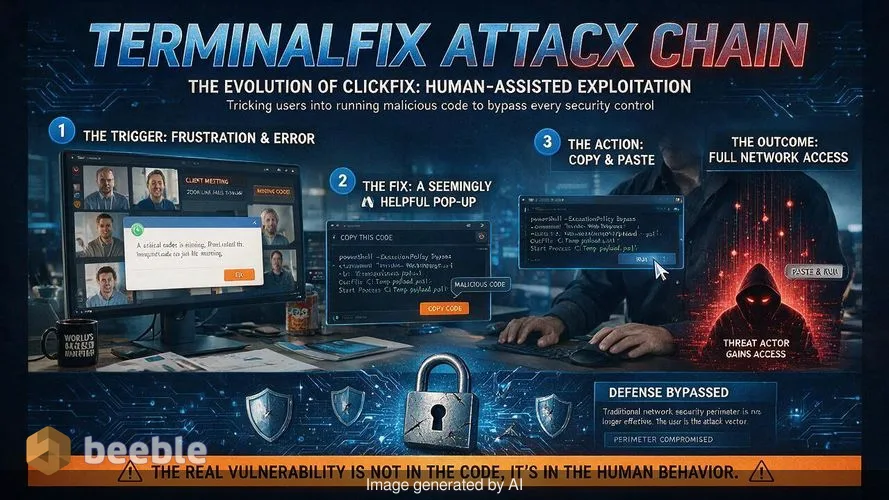
A marketing manager at a mid-sized firm is having a frustrating Tuesday. A Zoom link for a critical client meeting fails to load properly, displaying a browser error about a missing codec. A helpful pop-up appears with a 'Fix' button. It asks the manager to copy a line of code, open PowerShell, and paste the command to resolve the issue. Within seconds, the manager is back in the meeting, unaware that they just invited a threat actor into the company’s internal network. This is the core of the ClickFix social engineering tactic, and its latest evolution is a campaign Microsoft calls TerminalFix.
I recently analyzed a sample from this campaign in my lab. The technical sophistication of the malware is noteworthy, but the psychological manipulation is the real engine of the attack. Attackers have shifted from technical exploits to what I call 'human-assisted execution.' They no longer need to find a zero-day vulnerability in a browser when they can simply convince a human to bypass every security control on their own machine. From a risk perspective, this bypasses the entire concept of the network perimeter.
The psychological trap of the fake captcha
The TerminalFix campaign starts with a compromised website or a malicious advertisement. When a user lands on the page, they see a realistic overlay that mimics a Cloudflare CAPTCHA or a browser update notification. This is a clever choice because users are conditioned to trust these interfaces. We have been told for a decade that CAPTCHAs are the way we prove we are human and secure. The attacker subverts this trust by turning a security ritual into an infection vector.
In the TerminalFix variant, the user is instructed to perform a series of manual steps to 'verify' their identity or fix a rendering error. The instructions tell the user to press a specific key combination, like Windows key + R, or to open the Windows Terminal directly. While the user follows these steps, the website silently copies a malicious command to the system clipboard. When the user pastes what they think is a verification key, they are actually pasting a PowerShell one-liner that initiates a multi-stage infection.
Looking at the threat landscape, this method is remarkably effective because it avoids many traditional email gateway filters. There is no malicious attachment to scan and no suspicious link in an inbox. The interaction happens entirely within the browser and the user's local environment. By design, the command is often obfuscated or uses legitimate system tools like 'powershell.exe' or 'msiexec.exe' to download the next stage, making it difficult for basic antivirus software to flag the initial execution.
Moving from windows run to the terminal
Earlier ClickFix campaigns often relied on the Windows Run dialog to execute short commands. While effective for simple downloader stubs, the Run dialog has a character limit that restricts the complexity of the initial script. TerminalFix targets the Windows Terminal or PowerShell instead. This change is not just a cosmetic preference. A terminal window can accept significantly longer, multi-line scripts that include built-in logic for environment checks and anti-analysis routines.
Microsoft researchers argue that directing users into PowerShell increases the likelihood that complex scripts execute successfully. Modern Windows versions often open Terminal into a PowerShell session by default, providing the attacker with a powerful scripting environment out of the box. This complexity allows the attacker to conduct initial reconnaissance before any secondary payloads reach the disk. The script can check if the machine is joined to a domain, look for specific security software, or determine if it is running inside a virtual machine used by malware researchers.
Behind the scenes, the initial PowerShell command downloads a ZIP archive. Inside this archive is a legitimate executable and a malicious DLL. The attacker uses a technique called DLL sideloading. When the legitimate program runs, it looks for specific library files it needs to function. The attacker places a malicious file with the same name in the same folder. The system loads the malicious code instead of the real library. This is a stealthy way to hide malicious activity under the process name of a trusted application.
Steganography and the reverse tunnel implant
The attack chain does not stop at simple file execution. TerminalFix uses steganography to hide its secondary payloads inside seemingly harmless PNG image files. This is a reactive measure against network-based traffic inspection. A firewall might block a direct download of an executable file, but it is unlikely to flag a series of image downloads from a legitimate-looking domain. The malicious DLL extracts the hidden code from these images and assembles the final payload in memory.
One of the most dangerous components of this campaign is the Python-based reverse-tunnel C2 implant. This implant establishes a persistent connection to the attacker's infrastructure using an encrypted WebSocket channel. It tunnels arbitrary TCP traffic back through this channel. Proactively speaking, this is a nightmare for incident responders. It effectively places the attacker inside the internal network as if they were physically plugged into an ethernet port in the office.
In the event of a breach involving this reverse tunnel, the attacker has a direct line of sight into the organization's domain controllers, file shares, and internal applications. They can bypass many external-facing security controls because their traffic originates from a trusted internal host. Microsoft researchers have observed attackers using this access to escalate privileges and exfiltrate sensitive data. In some cases, this access leads directly to the deployment of ransomware across the entire enterprise.
Debating the novelty of the terminalfix naming
There is a healthy debate in the security community about whether TerminalFix is a truly distinct threat. Some researchers, including Tommy Madjar from Proofpoint, argue that the use of terminal windows is not a new development. They point out that earliest ClickFix activity from early 2024 already used terminal windows to execute payloads. From this viewpoint, TerminalFix is just another iteration of established clusters like ClearFake or ErrTraffic.
I communicate with several threat intelligence analysts via Signal who share this skepticism. They see these campaigns as a continuous evolution of social engineering lures rather than a set of distinct, branded threats. Whether we call it TerminalFix or a variant of ClearFake, the technical reality remains the same. The attackers are successfully moving away from automated exploits in favor of manipulating user behavior. This shift requires us to rethink how we defend the endpoint.
At the architectural level, the problem is that we have built systems that provide a massive amount of power to a standard user via the command line. While developers and system administrators need these tools, a typical office worker rarely needs to touch PowerShell. The TerminalFix campaign exploits this over-provisioning of capabilities. If a user has the power to run a script that creates a persistent network tunnel, then the security of the entire organization depends on that single user not being tricked.
Practical defense and the human firewall
Defending against TerminalFix requires a combination of technical restrictions and user education. Patching aside, the most effective technical countermeasure is the restriction of PowerShell and the Windows Run dialog for users who do not require them. Organizations can use Group Policy or AppLocker to create a 'deny by default' posture for these tools. If the marketing manager from my earlier example tried to open PowerShell and received a 'This action is restricted by your administrator' message, the attack would have failed immediately.
However, broad restrictions are not always feasible. Many modern software tools rely on terminal execution for installation and updates. As Tommy Madjar noted, even legitimate developer tools like Claude Code suggest installation methods that involve pasting commands into a terminal. This creates a confusing environment for users. They are told never to paste commands from a website, but then their official corporate tools ask them to do exactly that. This is why education is the mission-critical component of the human firewall.
Training must go beyond simple 'don't click' advice. Users need to understand the concept of a trusted source and the specific danger of the clipboard. I recommend that organizations conduct phishing simulations that specifically mimic the ClickFix technique. Seeing how easily a fake CAPTCHA can lead to a terminal prompt is an eye-opening experience for most employees. When users understand the 'how' behind the attack, they are more likely to be resilient when they face the real thing.
From a forensic perspective, security teams should monitor for unusual parent-child process relationships. It is rare for a web browser like Chrome or Edge to be the parent process for a PowerShell session that then spawns a network-active Python interpreter. These signals are granular indicators of a TerminalFix intrusion. Establishing a baseline of normal terminal usage allows the SOC to identify these anomalies before the attacker can move laterally through the network.
Key takeaways for enterprise security
- Audit the use of PowerShell and Windows Terminal across the organization and restrict access for standard users via GPO or AppLocker.
- Monitor for DLL sideloading indicators, specifically legitimate executables running from unusual directories or loading unsigned DLLs.
- Implement network monitoring to detect persistent, high-volume WebSocket traffic to unknown external IPs, which may indicate a reverse tunnel.
- Update security awareness training to include 'ClickFix' style lures and the dangers of pasting commands from the clipboard into terminal windows.
- Evaluate the use of application control solutions that can prevent unauthorized scripts from executing even if they are pasted into a legitimate shell.
Sources: Microsoft Threat Intelligence, MITRE ATT&CK (Techniques T1547.001, T1574.002, T1027.003), Proofpoint Threat Research.
This article is for informational and educational purposes only and does not replace a professional cybersecurity audit or incident response service.



See you on the other side.
Our end-to-end encrypted email and cloud storage solution provides the most powerful means of secure data exchange, ensuring the safety and privacy of your data.
/ Create a free account